



Note
Go to the end to download the full example code.
Zero Padding for FFT Enhancement#
This example demonstrates how to apply zero-padding to signals, a common technique
used to improve FFT frequency resolution. It shows the proper usage of
sigima.params.ZeroPadding1DParam, including the important
update_from_obj() call.
Zero-padding adds zeros to a signal, effectively interpolating the frequency domain representation. This is particularly useful for:
Improving frequency resolution in FFT analysis
Preparing signals for convolution operations
Matching signal lengths for spectral comparisons
Importing the required modules#
import numpy as np

import sigima.params
import sigima.proc.signal as sips
from sigima import viz
from sigima.objects import create_signal
Create a test signal#
We create a simple cosine signal with a specific frequency.
# Signal parameters
freq = 50.0  # Hz
duration = 0.1  # seconds
sample_rate = 1000  # Hz
n_points = int(duration * sample_rate)

# Create time array and signal
t = np.linspace(0, duration, n_points, endpoint=False)
y = np.cos(2 * np.pi * freq * t)

signal = create_signal(
    title=f"Cosine {freq} Hz", x=t, y=y, units=("s", "V"), labels=("Time", "Amplitude")
)

print(f"Original signal: {n_points} points")

viz.view_curves(signal, title="Original Signal")
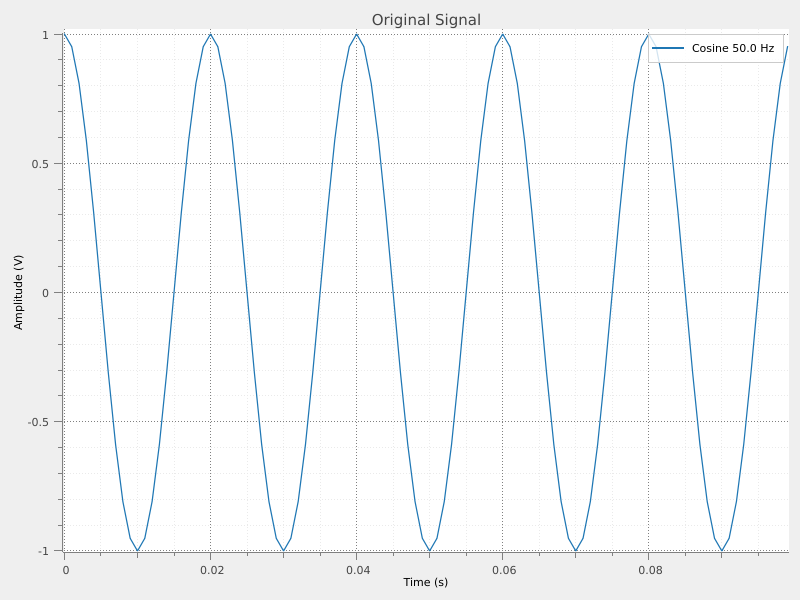
Original signal: 100 points
Zero-padding with “next_pow2” strategy#
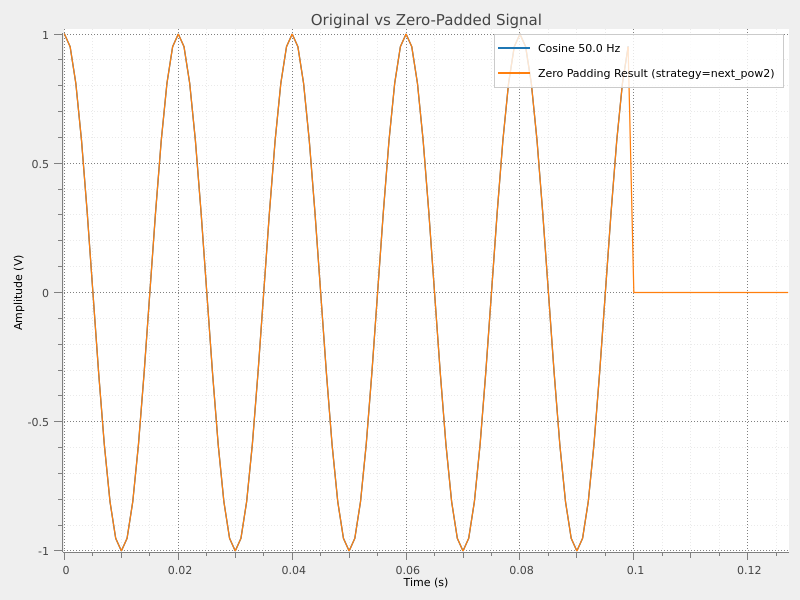
The “next_pow2” strategy pads the signal to the next power of 2, which is optimal for FFT computations.
Important
When using strategies other than “custom”, you must call
update_from_obj() to compute the number of padding points based on
the actual signal size.
# Create the parameter with "next_pow2" strategy
param = sigima.params.ZeroPadding1DParam.create(strategy="next_pow2")

# At this point, param.n is still the default value (1)
print(f"Before update_from_obj: n = {param.n}")

# IMPORTANT: Update parameters from the signal to compute the actual 'n'
param.update_from_obj(signal)

# Now param.n has been computed based on the signal size
print(
    f"After update_from_obj: n = {param.n} "
    f"(signal will be padded to {n_points + param.n} points)"
)

# Apply zero-padding
padded_signal = sips.zero_padding(signal, param)

padded_size = padded_signal.y.size
power_of_2 = 2 ** int(np.log2(padded_size))
print(f"Padded signal: {padded_size} points (power of 2: {power_of_2})")
Before update_from_obj: n = 1
After update_from_obj: n = 28 (signal will be padded to 128 points)
Padded signal: 128 points (power of 2: 128)
Compare original and padded signals#
The padded signal has zeros appended at the end.
viz.view_curves([signal, padded_signal], title="Original vs Zero-Padded Signal")
FFT comparison: improved frequency resolution#
Zero-padding improves the apparent frequency resolution of the FFT by interpolating between frequency bins.
# Compute FFT of original signal
fft_original = sips.fft(signal)
fft_original.title = f"FFT Original ({fft_original.y.size} bins)"

# Compute FFT of padded signal
fft_padded = sips.fft(padded_signal)
fft_padded.title = f"FFT Zero-Padded ({fft_padded.y.size} bins)"

print(f"Original FFT: {fft_original.y.size} frequency bins")
print(f"Padded FFT: {fft_padded.y.size} frequency bins")

viz.view_curves([fft_original, fft_padded], title="FFT: Original vs Zero-Padded")
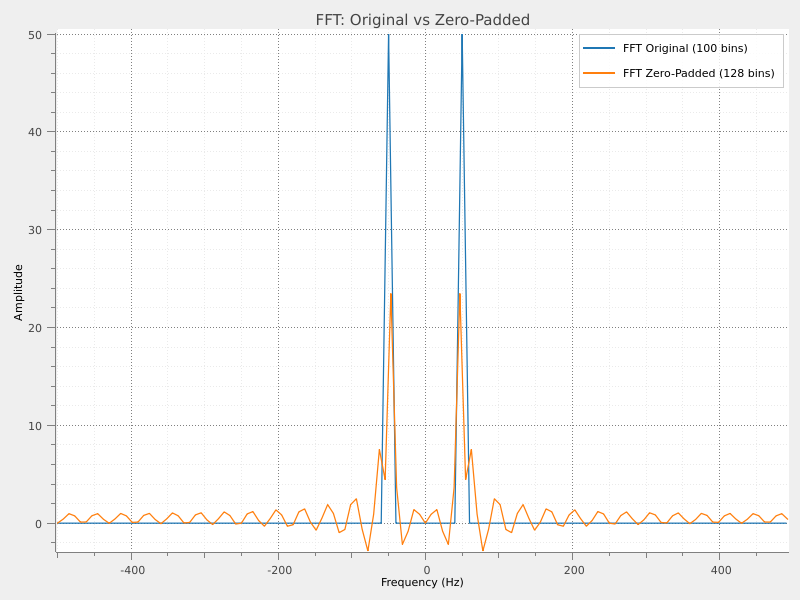
Original FFT: 100 frequency bins
Padded FFT: 128 frequency bins
Using different strategies#
The available strategies are:
"next_pow2": Pad to the next power of 2 (optimal for FFT)"double": Double the signal length"triple": Triple the signal length"custom": Specify the exact number of points to add
Strategy 'next_pow2': adds 28 points → total 128
Strategy 'double': adds 100 points → total 200
Strategy 'triple': adds 200 points → total 300
Using “custom” strategy#
With the “custom” strategy, you specify the exact number of points.
In this case, update_from_obj() is not strictly necessary (but harmless).
param_custom = sigima.params.ZeroPadding1DParam.create(strategy="custom", n=500)
print(f"Custom strategy: adds {param_custom.n} points")

padded_custom = sips.zero_padding(signal, param_custom)
print(f"Result: {padded_custom.y.size} points")
Custom strategy: adds 500 points
Result: 600 points
Choosing padding location#
Zero-padding can be applied at different locations:
"append": Add zeros at the end (default)"prepend": Add zeros at the beginning"both": Split zeros between beginning and end
from sigima.enums import PadLocation1D

results = []
for location in PadLocation1D:
    param = sigima.params.ZeroPadding1DParam.create(strategy="double")
    param.location = location
    param.update_from_obj(signal)
    result = sips.zero_padding(signal, param)
    result.title = f"Padded ({location.value})"
    results.append(result)
    print(f"Location '{location.value}': x=[{result.x[0]:.4f}, {result.x[-1]:.4f}]")

viz.view_curves(results, title="Padding Location Comparison")
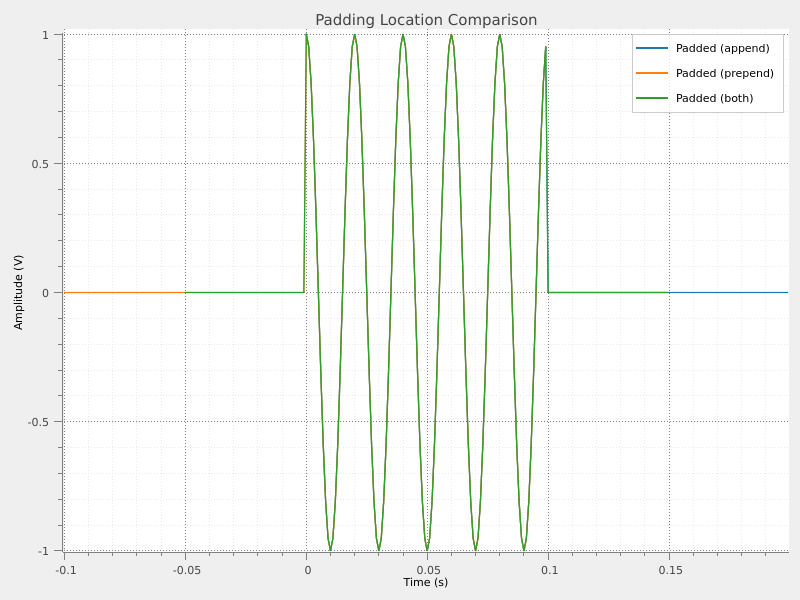
Location 'append': x=[0.0000, 0.1990]
Location 'prepend': x=[-0.1000, 0.0990]
Location 'both': x=[-0.0500, 0.1490]